
Your budget, on a calendar.
MakeChange is a budget calendar for iPhone. Every paycheck, bill, and subscription goes on the day it actually hits, so you can see your balance for every day of the month before it happens. No spreadsheet, no guessing whether rent clears.
Why a calendar beats a category budget.
Most budgeting apps split your money into categories: groceries, fun, bills. That tells you how much you meant to spend. It doesn't tell you whether you'll have enough on the 1st when rent comes out and payday isn't until the 7th.
Money problems happen on dates, not in categories. A budget calendar puts every dollar on the day it moves, so the tight days show up before you get to them.
- Balance for every day. Tap any date to see what's scheduled and what you'll have left that day.
- Paychecks and bills that repeat. Set weekly, every 2 weeks, monthly, or yearly once and the whole month fills in.
- Safe to spend. One number for what you can spend this week without coming up short later.
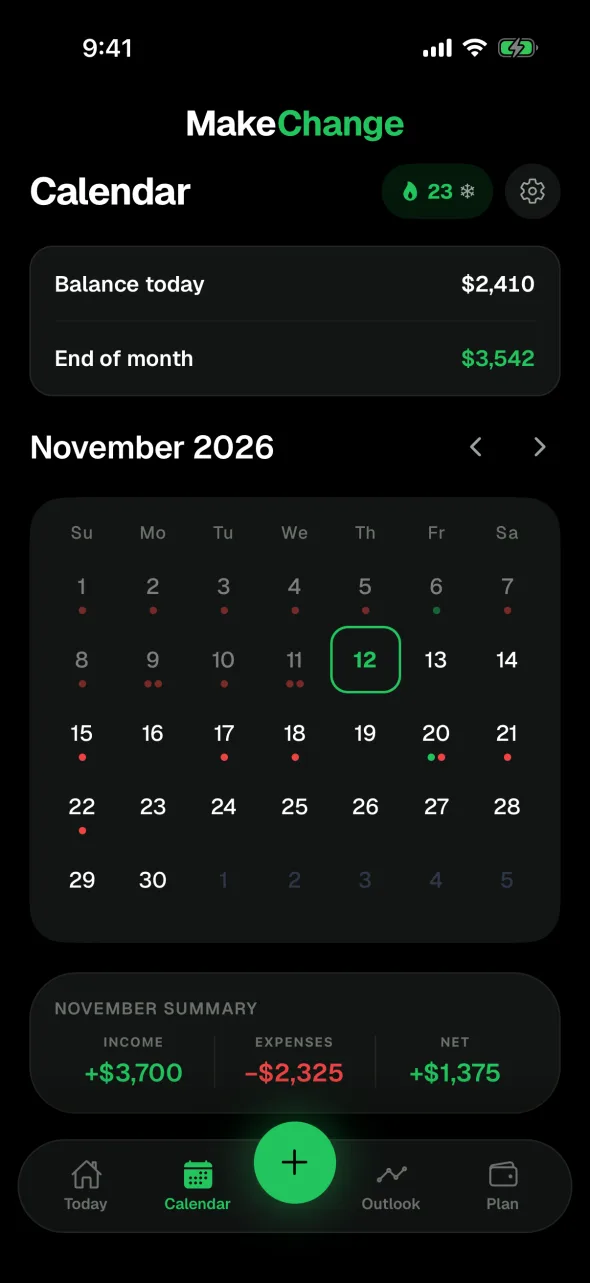
One month, day by day.
Here's a sample month on a budget calendar. The total at the end looks fine. The 5th doesn't.
Sample numbers. In MakeChange this is the calendar itself, with every day's balance one tap away.
Set up in a few minutes.
Add your paydays
Enter what you get paid and how often. Weekly, every 2 weeks, or monthly.
Add your bills
Rent, phone, car, subscriptions. Put each on its due date and set it to repeat.
See every day
Your balance fills in for the whole month, and safe to spend updates as you go.
Good to know.
What is a budget calendar?
A budget calendar puts your income and bills on the dates they actually happen, instead of in monthly categories. Because it knows the order money comes in and goes out, it can show your balance on any day, including the tight days right before payday.
Do I have to connect my bank?
No. MakeChange works from day one with balances and bills you type in yourself. Connecting a bank is optional.
Does MakeChange pay my bills or move money?
No. MakeChange is a plan you build, not a bank. It shows you what's coming and what you'll have left. It never moves money or pays bills for you.
How much does MakeChange cost?
MakeChange is $59.99 a year with a 7-day free trial, or $9.99 a month. Both plans include every feature.
Is there an Android version?
Not yet. MakeChange is built for iPhone and needs iOS 15 or later.
Your change starts here.
Put this month on a calendar in a few minutes and see what's coming before it hits.
Download MakeChange 7-day free trial on the yearly plan. Cancel anytime in Settings.