
MakeChange vs Rocket Money
Both apps help you see bills before they hit, but they're built for different jobs. Rocket Money connects to your accounts and finds your bills and subscriptions in your transactions. MakeChange is a budget calendar you can start without a bank login, built to show your balance on every day ahead.
Which one fits you?
Pick MakeChange if
- You want to see your balance on every day of the month, not just today.
- You'd rather not connect a bank, or want to start before you do.
- You plan paycheck by paycheck and want bills due before payday taken out first.
- You want an AI assistant that answers questions about your own calendar, included.
Pick Rocket Money if
- You want bills detected automatically from your linked accounts.
- You want to start on a free plan.
- You need Android, or a desktop version on Premium.
MakeChange vs Rocket Money, compared.
| MakeChange | Rocket Money | |
|---|---|---|
| Price | $59.99 a year with a 7-day free trial, or $9.99 a month. Every feature on both plans. | Free plan. Premium is pay what you think is fair, typically $7 to $14 a month. Premium+ is $15 a month. |
| Getting started | Type in your paychecks, bills, and balances. Connecting a bank is optional. | Built around linking your bank and card accounts. Manual transactions are a Premium feature. |
| Bills on a calendar | Included. | Calendar view is a Premium feature. |
| Balance for every day ahead | Every date shows what you'll have after everything scheduled before it. | Not listed in Rocket Money's feature comparison. |
| Paycheck planning | Paycheck Plan: bills due before your next payday come out first, then a daily number for the rest. | Payday View on Premium, built from paychecks detected in a linked checking account. |
| Platforms | iPhone (iOS 15 or later). | iOS and Android. Web access is a Premium feature. |
Rocket Money details are from rocketmoney.com and help.rocketmoney.com, checked November 2026. Prices and features change, so confirm on their site.
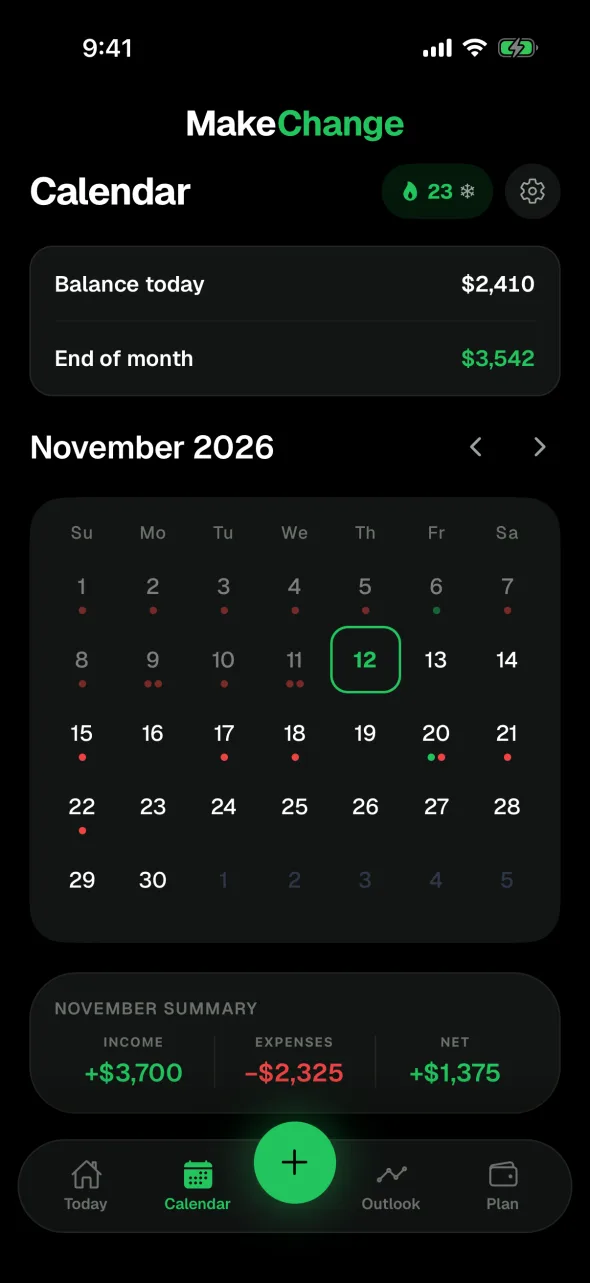
Today's balance vs. every day's balance.
An app connected to your bank is good at showing what already happened: what you spent, which subscriptions charged, what your balance is right now.
The question that causes overdrafts is a different one: what will my balance be on the 1st, after rent, before payday? MakeChange answers it by putting every paycheck and bill on the date it happens and showing the balance on each day ahead.
How the budget calendar worksGood to know.
Is MakeChange a Rocket Money alternative?
For planning, yes. If what you want most is to see your bills on a calendar and know your balance on any day ahead, MakeChange does that without needing a bank connection. If you want an app that scans your bank transactions to find bills and subscriptions, Rocket Money is built for that.
Can I use both?
Yes. Some people use a bank-connected app to see past spending and MakeChange to plan the month ahead. They don't conflict.
Does MakeChange cancel subscriptions for me?
No. MakeChange doesn't move money or contact companies. Delete a subscription from your calendar and you'll see exactly how much it changes your end-of-month balance, then cancel it with the company yourself.
Which costs less?
Rocket Money has a free plan, and its Premium is pay what you think is fair, typically $7 to $14 a month. MakeChange is $59.99 a year after a 7-day free trial, or $9.99 a month, with every feature included.
Your change starts here.
Put this month on a calendar in a few minutes and see what's coming before it hits.
Download MakeChange 7-day free trial on the yearly plan. Cancel anytime in Settings.